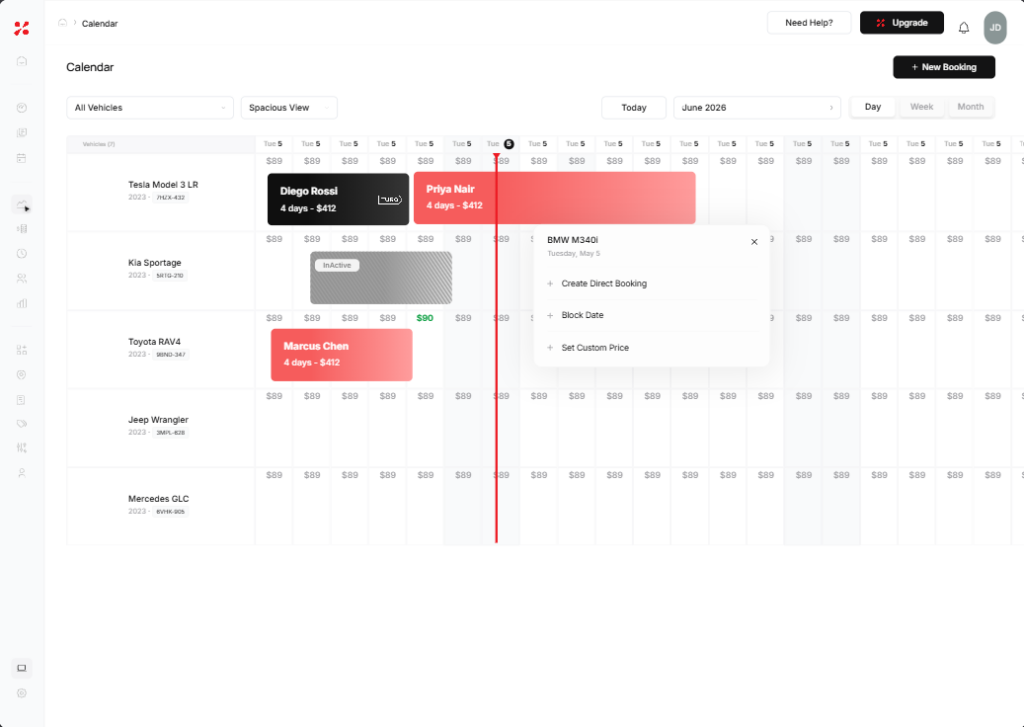
Car rental calendar management software pulls every booking channel, your own website, Turo, Getaround, and walk-ins, into one synced calendar, so a reservation on any platform instantly blocks that vehicle everywhere else. For operators running both direct and marketplace rentals, it is the difference between a smooth handoff and a double-booking disaster.
If you list on Turo for reach and take direct bookings to protect your margins, you already know the hard part: keeping two or more calendars in perfect sync. This guide breaks down why cross-channel conflicts happen and how to coordinate direct and marketplace bookings from a single view.
At a Glance: Coordinating Multiple Booking Channels
- Marketplaces like Turo are great for discovery, but their fees eat into every trip.
- Direct bookings protect your margin, but running them alongside a marketplace multiplies calendar risk.
- Manual calendar updates are the number one cause of cross-platform double bookings.
- Automated calendar sync blocks a vehicle everywhere the moment it is booked anywhere, which is the core job of good car rental calendar management software.
Why Managing Multiple Booking Channels Is Hard
A single vehicle can be exposed to demand from several places at once: your direct booking site, one or more peer-to-peer marketplaces, phone inquiries, and repeat customers texting you directly. Each channel keeps its own record of availability.
The moment those records fall out of step, you are exposed. A guest books your SUV on Turo at 9:02 a.m. while a repeat renter is checking out for the same dates on your website at 9:03 a.m. Without an automated link between the two, both bookings confirm, and you are left cancelling one, refunding a deposit, absorbing a no-show fee, and taking the reputation hit.
This is exactly why more operators run a dedicated car rental system rather than juggling separate marketplace apps and a spreadsheet.
How Cross-Channel Double Bookings Happen
Most conflicts trace back to a few root causes:
- Manual updates: Blocking dates by hand on each platform after every booking. It works with two cars. It breaks down at twenty.
- Sync lag: Even a few minutes between a booking and the availability update on another channel is enough for an overlap.
- No buffer time: Back-to-back trips with no gap for cleaning, inspection, or refueling create effective conflicts even when the calendar says the car is “free.”
- Cancellations and extensions: A guest extends a Turo trip, but your direct calendar never hears about it, so you book the car out from under them.
Manual Calendar Sync vs Automated Sync
| Factor | Manual Sync | Automated Sync |
| Speed | Minutes to hours of lag | Real time, instant blocking |
| Error rate | High; scales with fleet size | Near zero |
| Handles extensions/cancellations | Only if you remember | Automatically |
| Staff time | Constant manual effort | Set once, runs in the background |
| Scales past ~10 cars | Painful | Effortless |
For any fleet past a handful of vehicles, automated sync inside proper car scheduling software is no longer optional.
The Dual-Channel Strategy: Marketplace for Discovery, Direct for Margin
The most profitable operators do not abandon marketplaces. They use them deliberately. Turo and similar platforms are powerful acquisition channels that put your cars in front of millions of verified renters. The catch is the commission on every trip.
The smart play is to treat the marketplace as the top of your funnel and your direct booking channel as the margin engine: keep your listings live to capture new demand, then route repeat renters to your own site where you keep more of every dollar and control deposits, agreements, and verification. None of that works, though, unless your calendars stay locked together. That coordination is the entire point of multi-channel booking management.
How to Coordinate Direct and Marketplace Bookings, Step by Step
- Centralize every vehicle in one platform. Import your fleet into a single dashboard that will act as your source of truth.
- Connect your marketplace listings. Link each Turo or Getaround vehicle to its match in your car rental management software.
- Turn on two-way calendar sync. A booking on any channel should immediately block the vehicle on all others, including for changes and cancellations.
- Set buffer times. Add a gap between trips for turnaround so back-to-back rentals never collide.
- Route repeat renters to direct. Use follow-ups and booking links to move known customers to your own site and keep more margin.
- Monitor one unified calendar. Manage availability, pickups, and returns from a single view instead of switching between apps.
Handling Cancellations, Extensions, and Buffer Times
Coordination is not only about new bookings. The messy edge cases are where money leaks. Good car rental calendar management software should automatically propagate a marketplace cancellation back to your direct availability, extend a block when a trip runs long, and enforce your buffer rules on every channel. Handling these scenarios by hand is where even careful operators get caught.
How FleetHQ Handles Calendar Sync
FleetHQ was built for operators who run both direct and marketplace channels. Its Turo Calendar Sync pulls your marketplace bookings into the same fleet calendar as your direct reservations, so availability stays accurate everywhere without manual blocking. As one operator put it after switching, the sync alone ended the manual date-blocking and double-booking headaches.
From your first direct booking to a full fleet, FleetHQ centralizes bookings, payments, agreements, and verification in one place, so coordinating channels stops being a daily chore.
Ready to run every channel from one calendar? Start your free trial or book a demo to see FleetHQ’s calendar sync in action.
Conclusion
Coordinating direct and marketplace bookings comes down to one principle: a single source of truth for availability. Marketplaces drive discovery, direct bookings protect your margin, and car rental calendar management software with automated sync keeps both aligned so you never double-book a vehicle again.
See how FleetHQ unifies every channel into one calendar. Start your free trial, book a demo, or explore the platform at fleethq.io.
Read our guide to car rental renter verification.